Technical Diagramming
Clean vs Layered Architecture in Modern Software



Get your team started in minutes
Sign up with your work email for seamless collaboration.
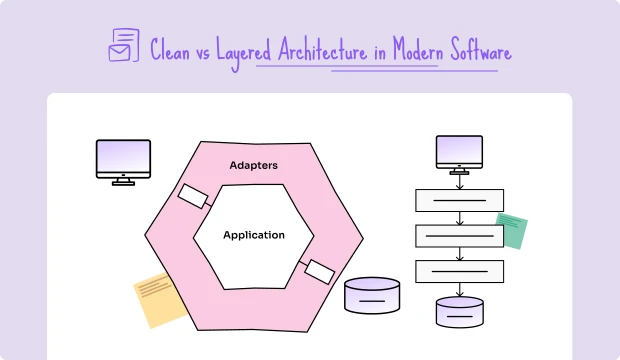
In practical software engineering work, architecture choices strongly shape long-term maintainability, future scalability, and overall developer productivity. Personally, I have seen that two of the most debated models are Layered Architecture (a widely traditional approach) and Clean Architecture (a thoughtful modern refinement by Robert C. Martin). Both clearly offer unique strengths and visible weaknesses, and the right choice usually depends on system complexity, actual team size, and future long-term goals. Genuinely understanding their differences helps ensure software systems remain both maintainable and highly scalable.
Curious to explore visually in detail? Try starting with the Layered Architecture Diagram Template or the Clean Architecture Diagram Template.
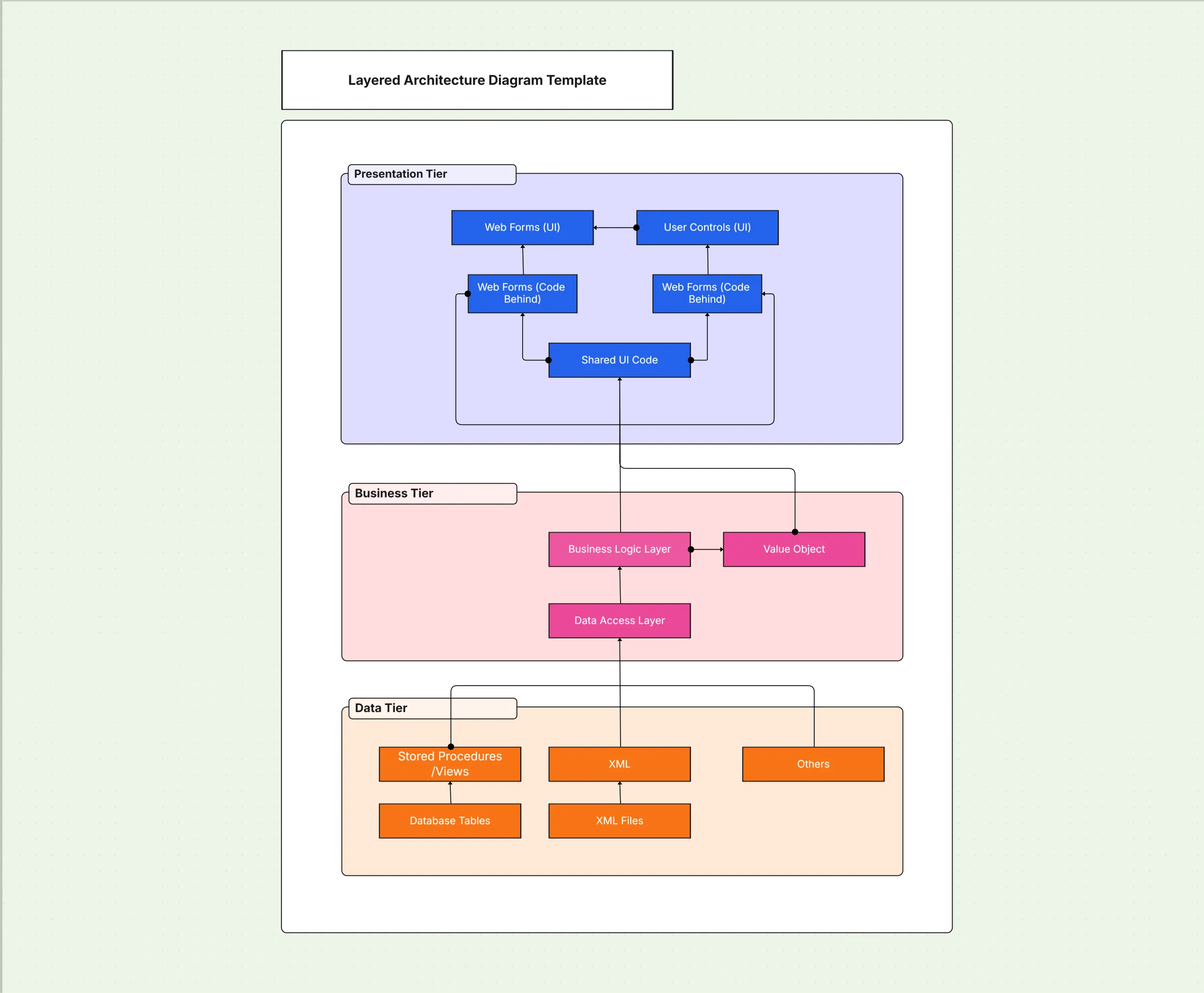
Layered architecture is one of the oldest and most frequently adopted software architecture diagrams that organizes code into horizontal layers; each layer has clearly defined responsibilities, which makes the code easy to build to reason about small to medium systems. The design guarantees a predictable structure for small to medium systems, but as applications grow, they can become inflexible and rigid. While layered architecture is simple, it may lead to coupling issues if the rules of the structure are not followed.
In software architecture diagrams, layered models remain popular for traditional enterprise systems.
Layered architecture organizes software into clear horizontal layers, where each layer communicates with the one directly below it.
Data typically flows downward, and changes in lower layers ripple upward.
A classic example of layered architecture is a banking application.
Visualize this structure with the Layered Architecture Diagram Template.
Clean architecture, proposed by Robert C. Martin (Uncle Bob), in my experience, places great emphasis on independence and genuine long-term maintainability. It strictly enforces the dependency rule, where inner layers, as I have noticed, know absolutely nothing about outer layers. This keeps core business rules comfortably isolated, which makes systems highly testable, framework agnostic, and flexible for future technology shifts. Personally speaking, this approach is widely adopted in enterprise SaaS and other long-lived systems where scaling and modularity really matter.
Clean architecture diagrams, as I usually explain, highlight inward-facing dependencies and a clear separation of concerns.
Clean architecture is built around concentric layers, with dependencies pointing inward.
Consider a SaaS subscription platform:
Explore this visually with the Clean Architecture Diagram Template.
.webp)
Layered architecture is straightforward but can become brittle at scale.
Strengths:
Weaknesses:
Use the Layered Architecture Diagram Template for smaller projects or prototypes.
Clean architecture offers flexibility but requires discipline and effort upfront.
Strengths:
Weaknesses:
Try the Clean Architecture Diagram Template for long-term projects with scaling needs.
Comparing the two models highlights when each is best suited.
| Aspect | Layered Architecture | Clean Architecture |
| Complexity | Simple | Moderate/High |
| Maintainability | Lower (tight coupling risk) | High (rules isolated) |
| Testability | Harder (cross-layer dependencies) | Easier (use cases isolated) |
| Scalability | Moderate | High |
| Best fit | Small to medium apps | Medium to large, long-lived systems |
For more comparisons, see C4 vs UML: Which Architecture Diagram Is Best?
The right model depends on scope, complexity, and roadmap.
Choose layered when:
Choose clean when:
Use the System Architecture Design Template to assess scope before deciding.
Shifting from layered to clean architecture can be gradual and low risk.
For a migration roadmap, use the System Architecture Design Template.
.webp)
Examples show how both models work in practice:
See the Enterprise Architecture Diagram Template for broader system contexts.
Maintaining consistency requires discipline beyond initial design.
Read How to Design a High-Level System Architecture Diagram for governance guidance.
The right tools simplify documentation and ensure alignment across teams.
Templates:
Tool:
The Cloudchart Architecture Diagram Maker helps teams:
Compare platforms in Best Tools to Create Architecture Diagrams.
There is no one-size-fits-all answer in the clean vs layered architecture discussion. Layered architecture is quicker and simpler, perfect for small or temporary projects. Clean architecture, meanwhile, is built for the long haul with flexibility to handle growing, complex systems. The trick is knowing which fits your needs and carefully documenting your decisions using clear diagrams.
Try out the Clean or Layered Architecture Diagram templates on Cloudchart to get going.
1.What is the main difference between clean and layered architecture?
2.When should I use layered architecture diagrams?
3.Why is clean architecture more maintainable?
4.Can I migrate from layered to clean architecture?
5.What tools help create clean and layered architecture diagrams?
Start using Cloudairy to design diagrams, documents, and workflows instantly. Harness AI to brainstorm, plan, and build—all in one platform.
Table of Contents

Introduction
 Manage all your work in one placeCollaborate with your teamUse Cloudairy for FREE—forever
.webp)
.webp)
.webp)


